
Digital Prayer Notes for Orthodox Church
Overview
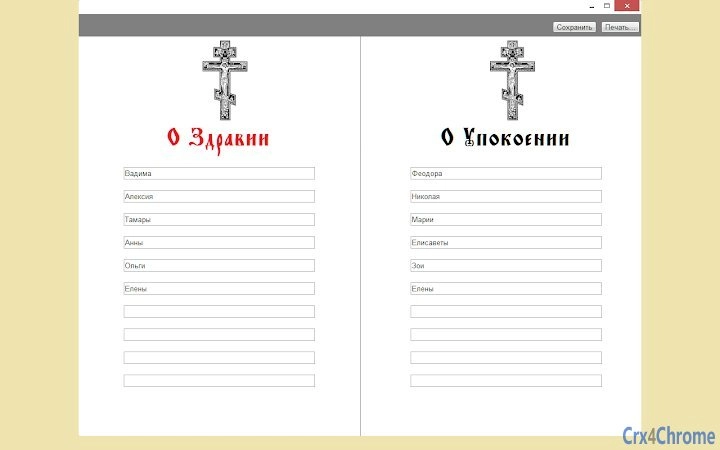
The application enables users to create, store, and print digital prayer notes designated for Orthodox Church use—specifically for "health" and "repose" intentions. Designed as a simple yet meaningful tool, it supports users in maintaining spiritual practices by offering a dedicated space to record personal prayers. The software operates across multiple platforms, allowing access from any device with Google Chrome or Chrome OS, provided the user is signed in with their account. This cross-device accessibility ensures continuity and convenience for individuals who may use different computers throughout the day.
Target users include members of the Orthodox Christian community seeking a structured way to manage prayer intentions. It is especially useful for those who prefer digital tools over handwritten notes, or who wish to maintain a consistent record of their spiritual requests. The application does not require installation on local machines beyond Chrome, making it ideal for shared or public computing environments. While the developer did not provide additional background, the software's focus on religious practice suggests a niche but dedicated audience.
Real-world usage scenarios include preparing notes before visiting a church, organizing personal prayer lists, or sharing intentions with family members who use the same account. The ability to print notes adds a tangible element to the digital process, aligning with traditional practices. The tool supports a seamless workflow between digital creation and physical presentation, bridging modern technology with long-standing religious customs.
Key Features & Capabilities
- Creation of Prayer Notes – Users can generate digital notes for "health" and "repose" with a straightforward interface, allowing for clear and organized input of names and intentions.
- Cloud-Based Storage – Notes are saved securely in the cloud via Google Chrome infrastructure, ensuring they remain accessible from any device with an internet connection and a Chrome browser.
- Multi-Platform Access – The application functions on Windows, Mac, Linux, and Chrome OS, enabling consistent use across diverse computing environments.
- Print Functionality – Completed notes can be printed directly from the application, supporting traditional practices that involve physical presentation at church.
- Duplicate and Clear Tools – Version 1.1 introduced a "Duplicate" button to streamline repetitive entries and a "Clear" button for resetting the form, improving workflow efficiency.
These features support users in maintaining a consistent spiritual routine. For example, a user can create a note for a sick relative, duplicate it for another family member, and print it before attending a liturgy. The cloud synchronization ensures that no data is lost when switching between home, work, or church computers. The design prioritizes simplicity and accessibility, making it suitable for users of varying technical skill levels.
User Interface, Workflow & Performance
The user interface is minimalistic, focusing on the core function: creating and managing prayer notes. Navigation is intuitive, relying on standard form fields and action buttons within the Chrome browser environment. Users are prompted to sign in with their Google account to access stored notes, which ensures secure access without requiring additional login steps.
Workflow efficiency is enhanced by the inclusion of the "Duplicate" and "Clear" buttons in version 1.1, reducing repetitive data entry and enabling quick form resets. The application does not require local installation beyond Chrome, which contributes to a lightweight and fast startup time. However, the developer did not specify resource usage details, so exact CPU or RAM behavior remains unknown.
Performance observations are based on general software behavior patterns. The application functions as a web-based tool, meaning its responsiveness depends on internet speed and the stability of the Chrome browser. Stability is expected to be consistent due to reliance on Google’s infrastructure, but this may vary depending on network conditions. No performance issues were reported in the provided information.
Compatibility & System Requirements
The software is compatible with Windows, Mac, Linux, and Chrome OS, making it accessible to a broad range of users. It operates exclusively within the Google Chrome browser or Chrome OS environment, meaning it cannot run on other operating systems without Chrome support.
The installation size is listed as 10 MB, which indicates a lightweight footprint. This small size suggests minimal impact on system storage and fast deployment. However, exact system requirements were not listed, so users should ensure their devices meet basic Chrome browser standards. The application relies on an active internet connection for cloud synchronization and data access.
Compatibility information was partially provided. While the supported platforms are clearly stated, details about minimum processor speed, RAM, or graphics requirements are not available. Users are advised to verify that their device runs a current version of Chrome to ensure optimal functionality.
Pros and Cons
Pros
- Free to use with no hidden costs
- Accessible across multiple operating systems via Chrome
- Cloud synchronization ensures data availability on all devices
- Simple, focused interface tailored to prayer note creation
- Supports printing for traditional church practices
- Version 1.1 includes useful workflow enhancements
Cons
- Requires Google Chrome or Chrome OS to function
- Dependent on internet connectivity for full functionality
- Developer background not disclosed
- No offline mode available
- Limited customization options for note formatting
FAQ Section
Is the software available for free?
Yes, the software is free to download and use. There are no subscription fees or premium tiers.
Can I use this application on my Mac or Linux device?
Yes, the application is compatible with Mac, Windows, Linux, and Chrome OS as long as you have Google Chrome installed.
Is my data secure when stored in the cloud?
Data is stored through Google Chrome’s infrastructure, which uses industry-standard encryption. Access is restricted to users signed in with their Google account.
How often are updates released?
Updates are released as needed. The latest version, 1.1, includes new features like "Duplicate" and "Clear" buttons.
Can I use this tool without an internet connection?
No, the application requires an active internet connection to access and sync data across devices. It does not support offline usage.
Final Thoughts
For members of the Orthodox Christian community seeking a reliable, simple tool to manage prayer intentions, this application offers a practical solution. Its cloud-based design ensures that notes are always available when needed, whether at home, work, or church. The integration of printing functionality respects traditional practices while embracing digital convenience.
While it lacks advanced features and is limited to Chrome-based environments, its focus on core functionality makes it highly effective for its intended purpose. The addition of version 1.1 improvements demonstrates ongoing development and user-centered updates. With no cost and broad platform support, it stands out as a valuable resource for spiritual organization.
Download Digital Prayer Notes for Orthodox Church now.







